Barcode labels for Shopify

Labels that scan.
Every time.

Assign unique barcodes, design a label at its true physical size, and print the right quantity straight from your Shopify inventory — built to fix what the default barcode app gets wrong.

Free for 30 labels/mo · no card required
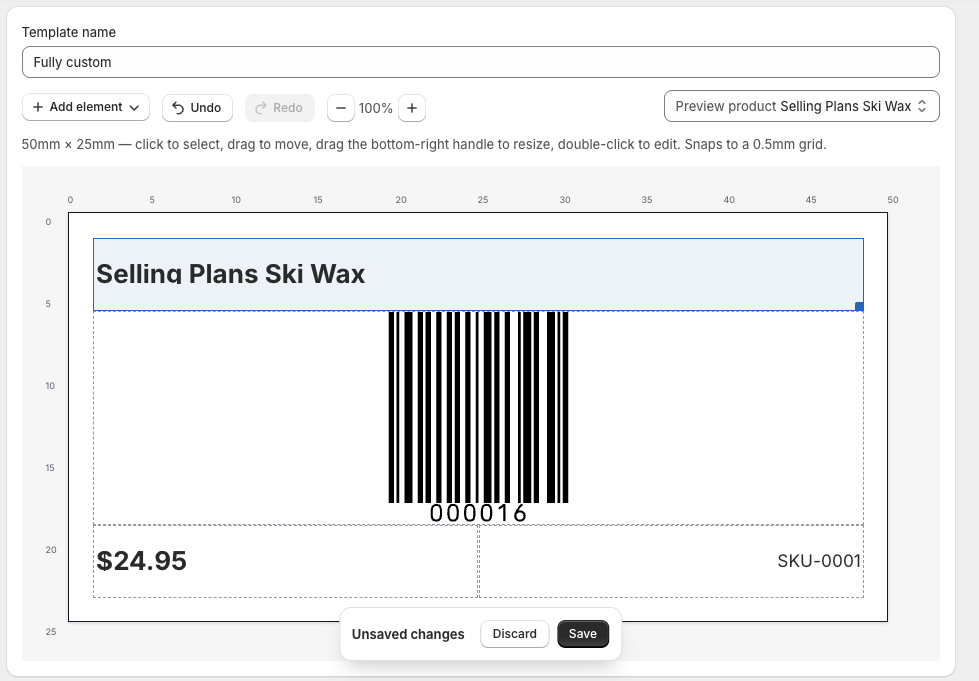
The LabelForge template editor: a 50 by 25 millimeter label laid out on a millimeter grid with a barcode, product name, price, and SKU positioned at true physical size.

Sound familiar?

The default barcode app has a reputation.

01

Barcodes change on their own

A regenerated number means every label already on your shelves stops matching.

02

One label per product, always

Ten units in stock, one label printed. Every run turns into a second run.

03

Labels print off-center

No way to nudge the position, so sheets get wasted until it lines up by luck.

What you get

Built around five specific fixes.

Barcodes that don't move

An existing barcode is never overwritten. New numbers only go on variants that don't have one yet.

audit-logged on every write

Guaranteed-unique numbers

Every assignment is checked against your entire catalog first — plus a built-in duplicate finder.

catalog-wide check

Prints the right quantity

Defaults to your on-hand count per location, editable per row, with a one-click bulk override.

inventory-aware

Dimension-exact, any size

Vector output, not a screenshot — 66.675mm prints as 66.675mm, from jewelry tags to full sheets.

66.675mm = 66.675mm

Alignment you control

Print a calibration sheet, enter the offset in mm once, and every future print lands centered.

saved per template

How it works

Three steps, no manual required.

01 / ASSIGN

Assign barcodes

Filter for products missing a barcode, select them, and generate unique numbers in one click.
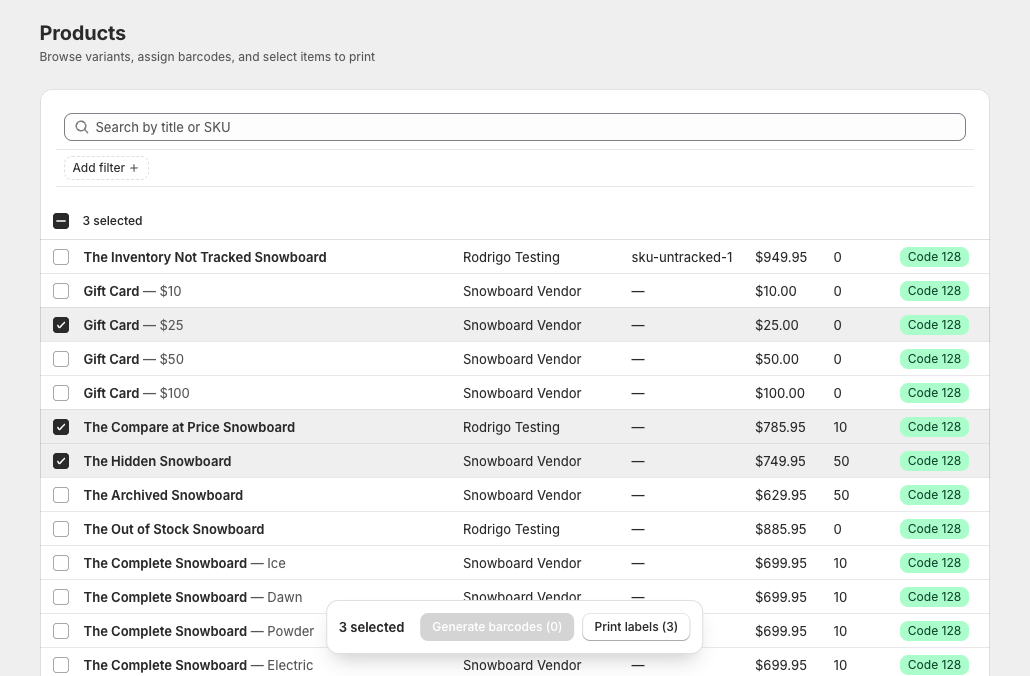
The product browser listing Shopify variants with prices, on-hand counts, and barcode symbology, with several selected and a bulk action bar to generate barcodes or print labels.
02 / DESIGN

Design the label

Pick a preset or build a custom size in the drag-and-drop editor, at true physical scale.

The template editor with a label design on a millimeter grid: a product-name box, a barcode, a price, and a SKU snapped to the grid at true size.
03 / PRINT

Print exact quantities

Quantities default from inventory. Generate a print-ready PDF sized to your sheet or roll.
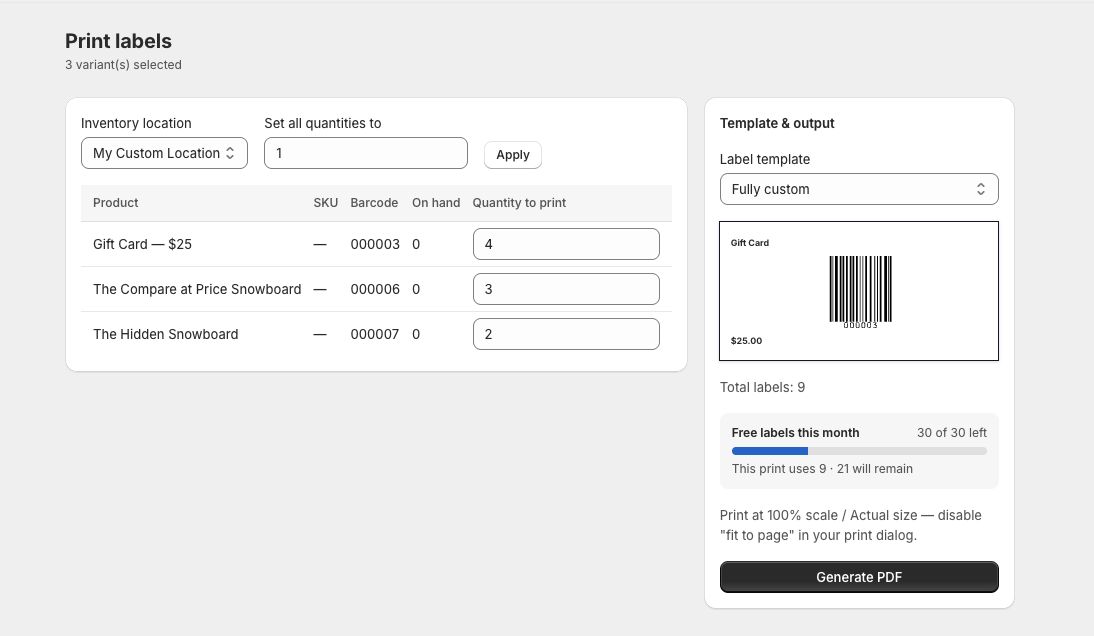
The print screen: a table of products with a quantity-to-print per row, a live label preview with a barcode, a monthly free-label meter, and a Generate PDF button.

Before you print

Catch duplicate barcodes first.

One click scans your whole catalog for a barcode assigned to more than one variant — so you never print two different products that scan as the same thing.
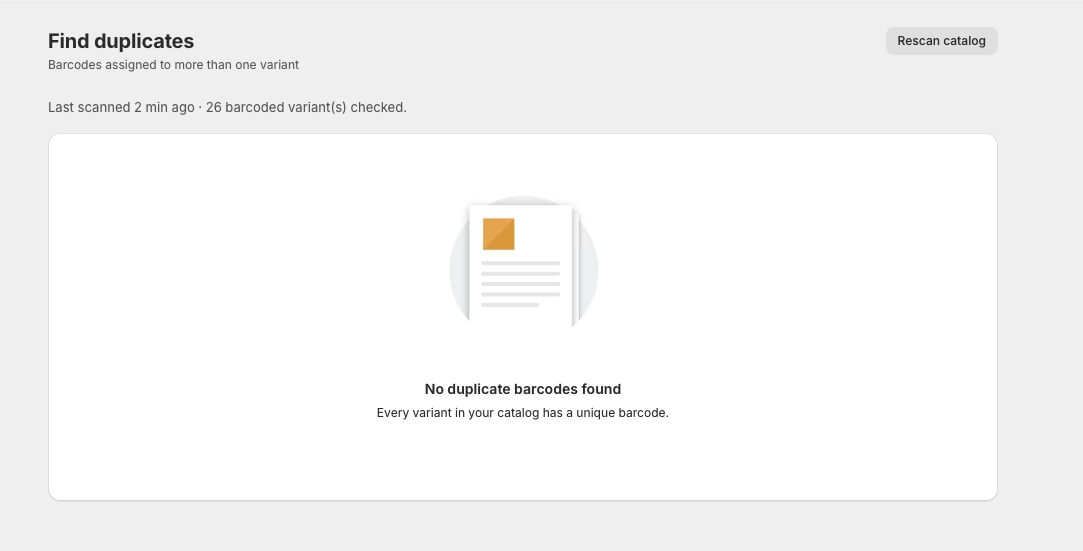
The duplicate-barcode finder showing a clean result: every variant in the catalog has a unique barcode, with a rescan button and a count of variants checked.

Compatibility

Works with the labels you already buy.

Avery 5160 / 81603×10 sheet · 66.675×25.4mm
Avery 5163 / 81632×5 sheet · 101.6×50.8mm
Dymo 30252roll · 88.9×28.575mm
Dymo 30334roll · 57.15×31.75mm
Zebra 2.25″×1.25″roll · 57.15×31.75mm
Zebra 2″×1″roll · 50.8×25.4mm
Jewelry / dumbbell tag50×10mm
Custom sizeany width × height

Pricing

Simple, and it stays that way.

Free
$0/mo
Enough to run a real store while you try it out.
  • 30 printed labels / month
  • Unlimited templates
  • Duplicate finder
  • Print calibration
Start free

FAQ

Questions merchants actually ask.

Will this change barcodes I already have?
No. We never overwrite an existing barcode — if a variant already has one, it's left alone and reported back to you. New barcodes are only assigned to variants that don't have one, and every assignment is checked against your whole catalog first so it can't collide with something already in use.
Does LabelForge work with Dymo or Zebra label printers?
Yes — Dymo 30252, Dymo 30334, and two common Zebra roll sizes are built in as presets, alongside Avery sheet labels. Each roll preset generates one label per page at the label's exact physical size, matching how those printer drivers expect input.
How do I print Avery 5160 labels from Shopify?
Pick the Avery 5160/8160 preset, select the products you want labels for, and generate. If you're using a partially-used sheet, click the position picker to start printing from any of the 30 slots instead of the first one.
My labels print off-center on the sheet — can that be fixed?
Yes. Print the built-in alignment test page once, measure the offset in millimeters, and enter it in the template's calibration settings. That offset is saved and applied to every future print of that template.
What happens after the free trial?
Pro is $9.99/month after a 7-day free trial, billed through Shopify. You can cancel anytime from the app or your Shopify admin — no separate account or card needed.
What's included in the free plan?
The free plan includes 30 printed labels per month, unlimited templates, and the full barcode-assignment tools. It resets every month — no credit card required to start.
What happens to my data if I uninstall the app?
Your access is revoked immediately. Templates, barcode history, and print logs are kept for 48 hours in case you reinstall, then permanently deleted. We never store customer data — only shop settings and product-level barcode assignments.

Ready when you are

Print labels that scan the first time.

Free for 30 labels a month. No credit card to start.

Install on Shopify